Disambiguations
The reason for this chapter is simple: many words in electronics and embedded systems are used with more than one meaning, and for us in AMC, it is important to have a clear understanding of the meaning in order to gather, read, and assess resources and tutorials that you can find in the wild internet. Take as example, a tutorial may say "ESP32 board" a product page may say "ESP32 module" a datasheet may describe an "SoC" and another article may call the same family of devices a "microcontroller". These terms are related, but they are not identical. If the distinction is not clear, it becomes harder to understand datasheets, select examples, install tools, or debug problems.
This is especially important when searching for information online. Search results, forum answers, manufacturer pages, and educational tutorials often assume that the reader already understands the context. In practice, you need to learn not only what a term means, but also how the term is being used in a particular sentence.
 |
|---|
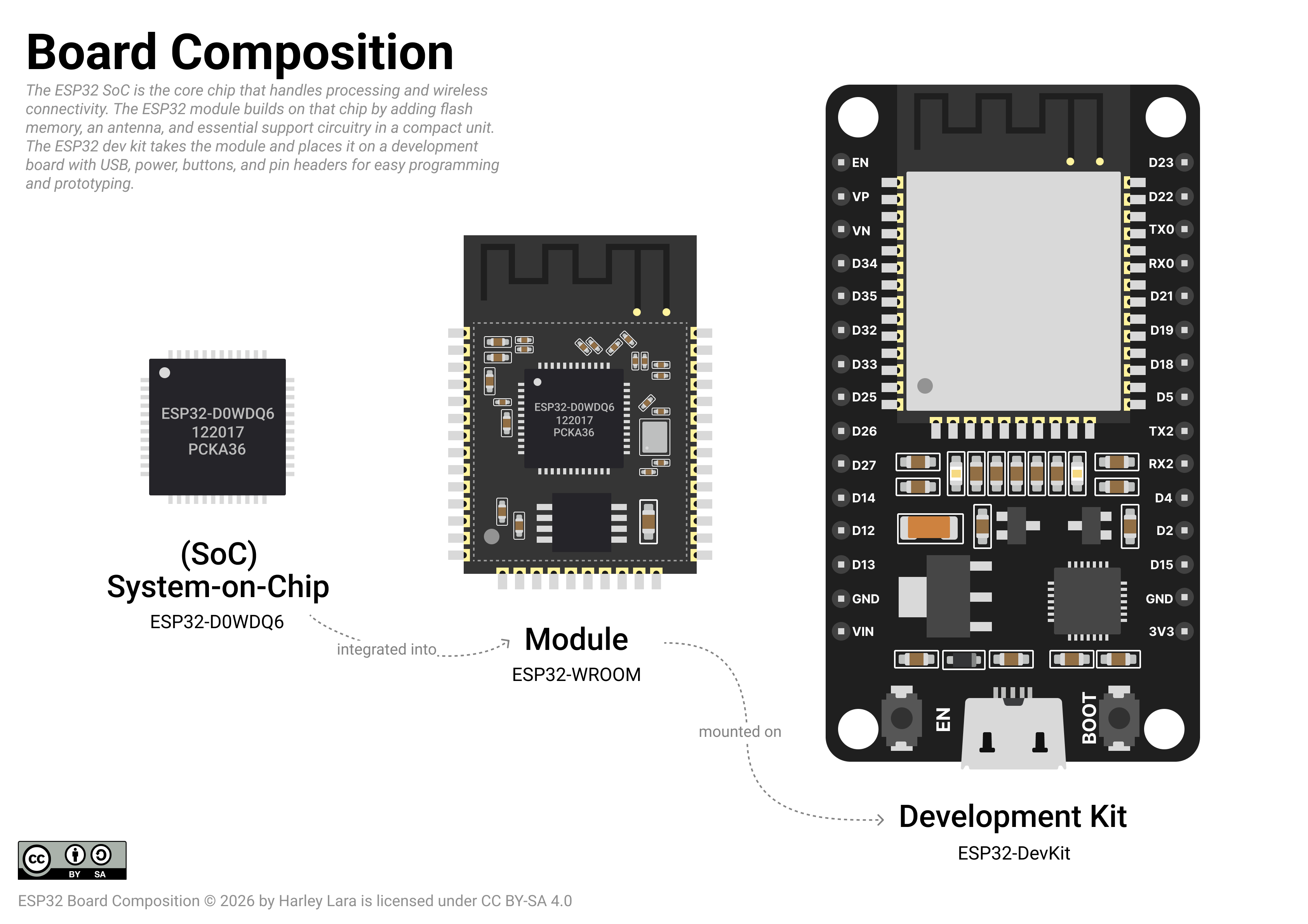
| Example of the different physical levels that may be described as “the ESP32.” |
The image above shows the main distinction this chapter is concerned with. In casual speech, people may refer to the whole object as an "ESP32". Technically, however, several different things are present: the silicon chip (SoC), the module, and the development board. Each level has a different role.
Why These Terms Become Confusing
Embedded systems sit between electronics, computer architecture, and software development. Because of that, the same device can be described from several points of view.
From the electronics point of view, the object on the breadboard may be a circuit board with pins, power rails, and components. From the computer architecture point of view, the important part may be the processor core, memory, peripherals, and buses. From the programming point of view, the important question may be which framework, compiler, and upload tool are required.
All of these views are valid. The problem appears when terms from one view are used as if they automatically mean the same thing in another view.
For example, when someone says “program the ESP32” they may mean programming an ESP32-based development board through USB. When a datasheet says "ESP32", it may refer specifically to the integrated circuit made by Espressif. When a product listing says "ESP32 module", it may refer to a small board containing the ESP32 chip plus supporting parts. These are not contradictions; they are different levels of description.
In AMC, we are not expecting you, the student, to have background in electronics, computer architecture, or software, but we want to provide you with the necessary tools and wording so you can communicate effectively with the experts in the matter. So the goal is not to memorize every possible industrial naming convention. The goal is to become careful enough with terminology that you can read technical material without being misled by informal wording.
Integrated Circuit, Processor, and Microprocessor
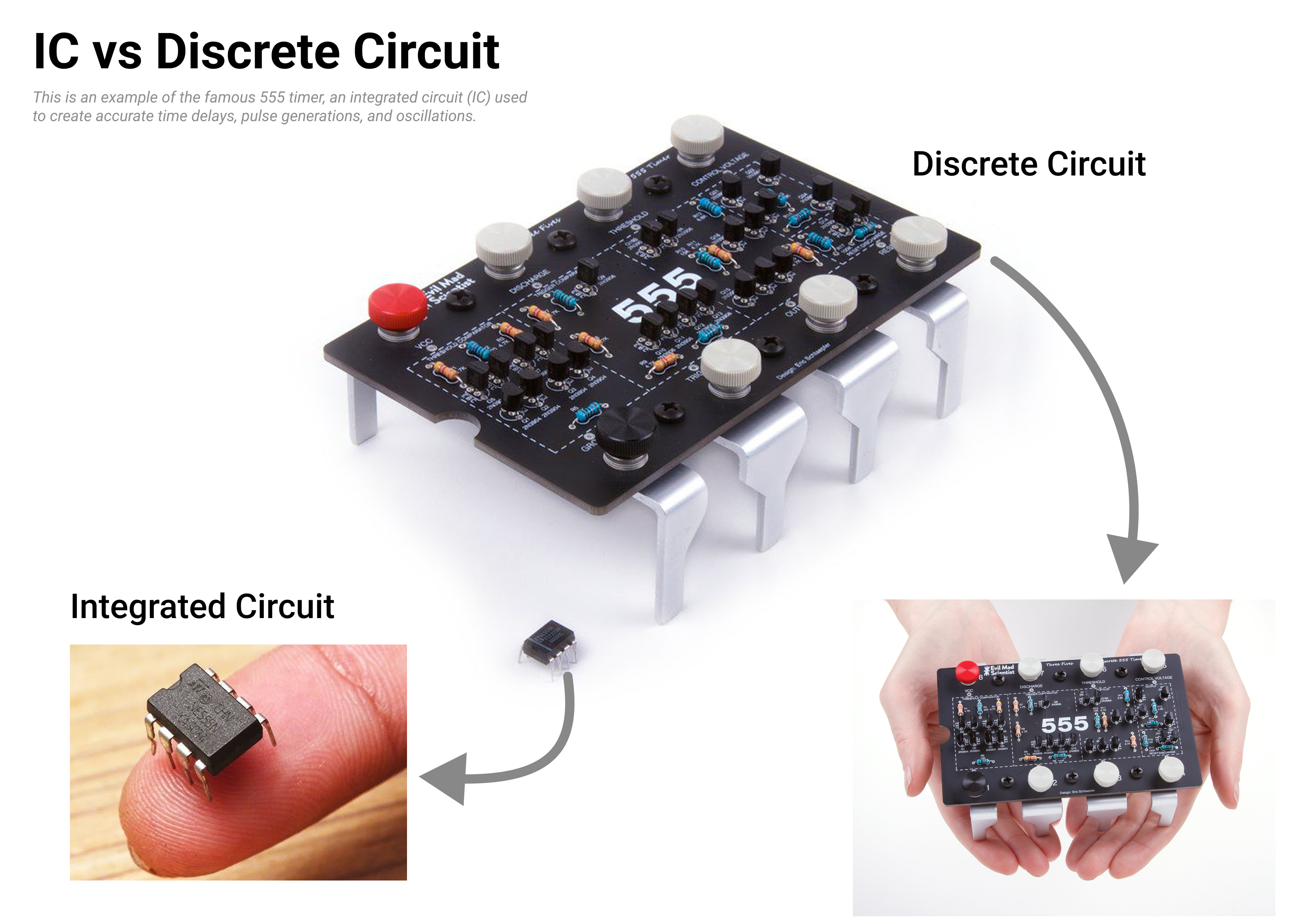
A good starting point is the term integrated circuit, often abbreviated as IC. An integrated circuit is an electronic circuit manufactured as a single physical component, usually inside a black package with metal pins or pads. The package is what you can see and solder; the actual circuit is inside it.
Many electronic components are ICs. A voltage regulator can be an IC. A motor driver can be an IC. A memory chip can be an IC. A microcontroller can also be an IC. Therefore, the term IC is broad. It tells you that the circuit is integrated into a chip package, but it does not tell you what kind of function the chip performs.
A processor is a functional unit that executes instructions. It is the part of a computing system that performs operations according to a program. The term processor describes a role, not necessarily a complete physical product by itself.
A microprocessor is a processor implemented as an integrated circuit. Historically, a microprocessor usually referred to a CPU on a chip, with memory and many supporting components placed outside that chip. A classic desktop CPU is a microprocessor in this sense: it is the central processing unit, but it depends on external memory, storage, power regulation, and many other system components to become a complete computer.
This distinction matters because a microprocessor is not necessarily a complete embedded control system by itself. It executes instructions, but it may require several external components before it can be used in a practical circuit.
 |
|---|
| Example of the different physical levels that may be described as “the ESP32.” |
The discrete version of the 555 used in this image was the The Three Fives (555) Kit by Evil Mad Scientist.
The image of the 555 in a tip of a finger is from Top 6 Life hake of 555 timer ic _ by Et Discover
Microcontroller Unit, or MCU
A microcontroller unit, usually abbreviated as MCU, or simply microcontroller is usually self-contained and compact computing device intended for control tasks. In practical terms, an MCU usually contains a processor core, memory, and input/output peripherals inside one integrated circuit.
This is what makes microcontrollers useful in embedded systems. They are not just made to compute; they are made to interact with hardware. A microcontroller can read digital inputs, produce digital outputs, measure analog voltages through an analog-to-digital converter, generate timing signals, communicate through serial protocols, and control external components.
For example, when an MCU reads a button and turns on an LED, it is not only running software. It is directly changing electrical states on physical pins. That combination of computation and hardware interaction is the defining feature of microcontroller work.
The term MCU is widely used in industry, datasheets, tutorials, and product documentation. You may not always find one single universal definition used in exactly the same way by every standards body or manufacturer, but the practical meaning is stable: an MCU is a small computer-on-a-chip designed for embedded control.
In AMC, when we say microcontroller, we usually mean the programmable device that reads inputs, executes your program, and controls outputs in a circuit.
System on Chip, or SoC
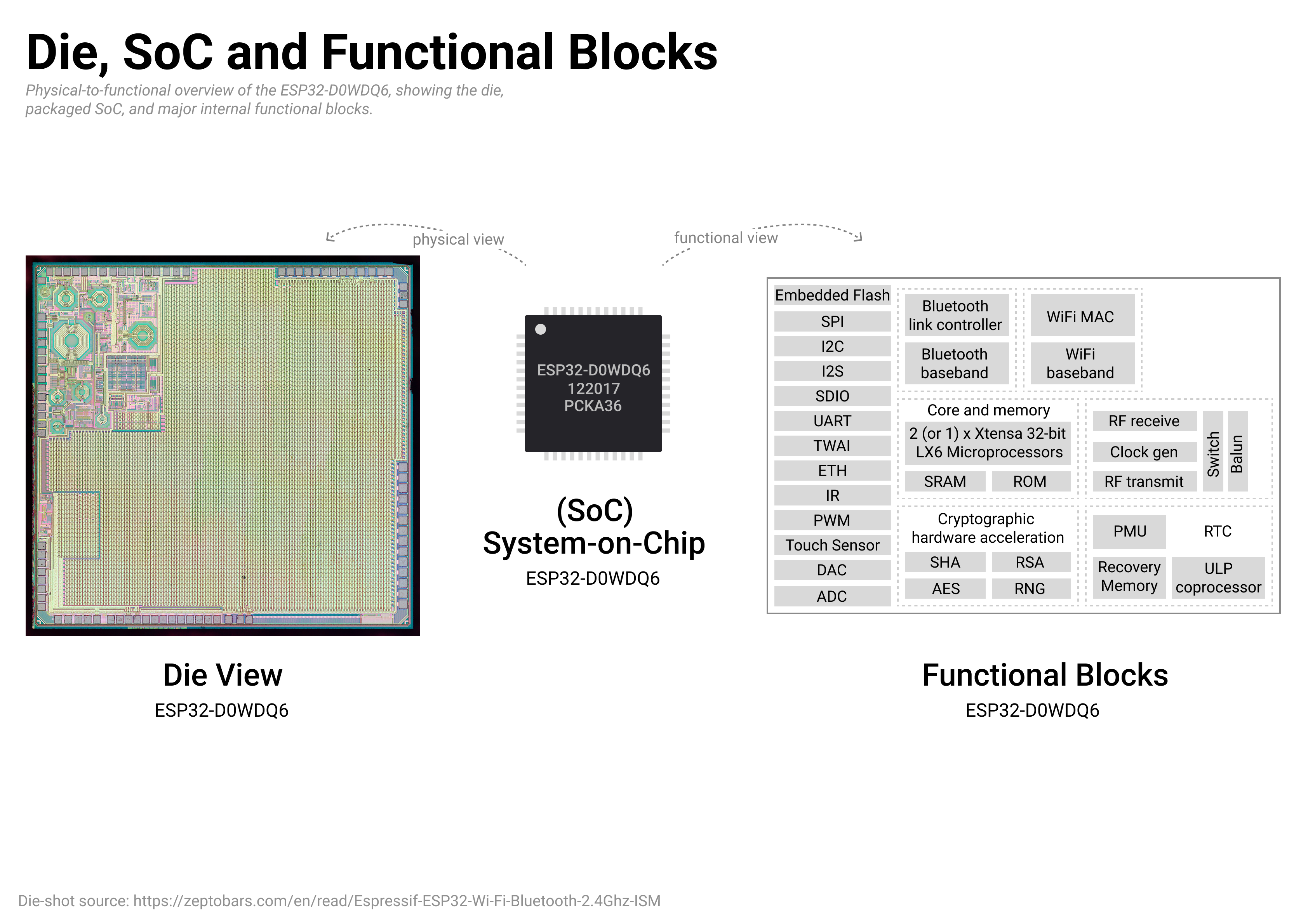
A System on Chip, usually abbreviated as SoC, is an integrated circuit that combines many parts of a computing system into a single chip. The idea is broader than a simple processor. An SoC may include processor cores, memory interfaces, communication controllers, timers, analog peripherals, wireless radios, security hardware, and other specialized blocks.
The ESP32 is commonly described as an SoC because it integrates much more than a basic processor. Depending on the specific ESP32 variant, it may include CPU cores, Wi-Fi, Bluetooth or Bluetooth Low Energy, timers, communication interfaces, analog peripherals, and other hardware features.
This creates an important point: MCU and SoC are not always mutually exclusive terms. A device can be described as a microcontroller because it is used for embedded control, and also as an SoC because it integrates many system-level functions on one chip.
The difference is mostly in emphasis. When someone says MCU, they are usually emphasizing embedded control and interaction with hardware. When someone says SoC, they are usually emphasizing integration: many system components are placed inside the same chip.
For a beginner, the safest reading is this: an SoC is a highly integrated chip; an MCU is a chip intended for embedded control. Many modern microcontrollers, especially wireless ones such as the ESP32, can reasonably be described using both terms.
 |
|---|
| Example of the different physical levels that may be described as “the ESP32.” |
Die photo: Espressif ESP32 by Zeptobars.com.
Module
A module is a step above the bare chip. It is usually a small circuit board that contains the main chip plus supporting components needed to make it easier to use.
For the ESP32 family, a module may contain the ESP32 chip, flash memory, a crystal oscillator, RF components, and an antenna or antenna connector. Many ESP32 modules are covered by a metal shield. The shield is not decorative; it helps with electromagnetic behavior and is also common in radio-certified modules.
The module is still not usually the final board that a student plugs into a computer. It is often intended to be soldered onto another board. Manufacturers use modules because they simplify design. Instead of designing the complete radio section from zero, a product designer can use a prebuilt module that already contains the critical parts.
This is why a product page may say “ESP32-WROOM module” or “ESP32-S3 module.” That does not necessarily mean it is ready to plug into a breadboard or program through USB. It may only mean that the small module contains the ESP32-based hardware core.
In the physical hierarchy, the module is between the chip and the development board. It contains the chip, but it is not yet the full development kit.
Development Boards and Development Kits
A development board, sometimes called a DevBoard, is a larger board designed to make the microcontroller or module easier to use during development. It normally exposes pins through headers, provides power regulation, includes a USB connection, and adds buttons or circuits required for programming and resetting the device.
A development kit, often shortened to DevKit, usually means a development board plus the supporting design needed to evaluate or use a chip family. In casual use, DevBoard and DevKit are often used almost interchangeably. The distinction is not always strict.
The DOIT ESP32 DevKit used in AMC is a development board. It is not only the ESP32 chip. It includes an ESP32 module, USB-to-serial circuitry, voltage regulation, reset and boot buttons, and header pins that can be connected to a breadboard.
This matters when following tutorials. If a tutorial says “connect GPIO 2,” it is talking about a pin of the ESP32 microcontroller. On the development board, that signal is routed to a physical header pin. The name printed on the board, the GPIO number used in code, and the physical location of the pin are related, but they are not the same kind of information.
When debugging, it helps to ask which level you are dealing with. Are you talking about the chip, the module, the development board, or the breadboard connection? Many beginner mistakes come from mixing these levels.
 |
|---|
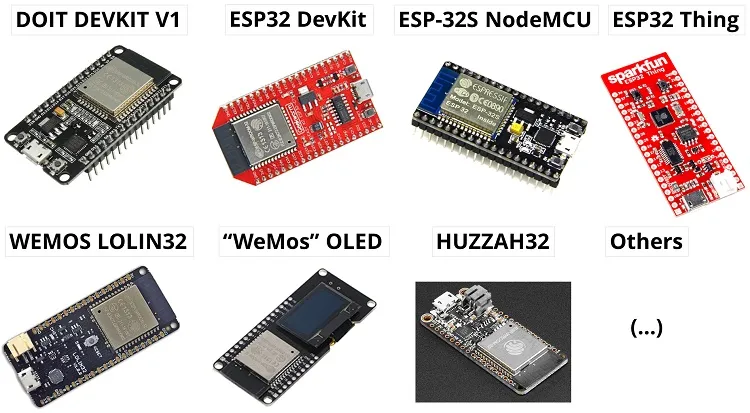
| Same ESP32 Module different development board by multiple vendors. Image source esp32-boards by Random Nerd Tutorials |
Reading Product Names and Tutorials Carefully
When you see the word ESP32, do not assume immediately that it refers to only one thing. It may refer to the chip family, a specific chip, a module, a development board, or the general ecosystem.
The same problem appears with other platforms. A tutorial may say “Arduino,” but it may mean the Arduino company, an Arduino-branded board, the Arduino IDE, the Arduino programming framework, or the style of code used in an Arduino sketch.
This does not mean the tutorial is wrong. It means the language is informal. Technical communities often use shorthand because experienced readers can infer the missing context. As a student, you should learn to slow down and identify what the word means in that sentence.
A useful habit is to translate informal wording into a more precise form. If a tutorial says “upload this Arduino code to the ESP32,” the precise meaning is usually: create a project using the Arduino framework for an ESP32-based board, compile the sketch, and upload the resulting firmware to the board through the configured upload method.
That sentence is longer, but it is more accurate. With practice, you will make this translation automatically.
Arduino Is Not One Thing
The word Arduino is one of the most common sources of confusion in beginner embedded programming. It is used to refer to several related but different things.
First, Arduino is a company. The legal entity associated with the trademark is Arduino S.r.l. The abbreviation S.r.l. stands for Società a responsabilità limitata, which is an Italian legal form similar in function to a limited liability company.
Second, Arduino refers to a family of physical boards. The classic Arduino boards, such as the Arduino Uno, are development boards built around microcontrollers. Many early and well-known Arduino boards used Atmel AVR microcontrollers, such as the ATmega328P. However, Arduino-branded boards are not limited to one microcontroller vendor or one processor architecture. Different Arduino boards may use microcontrollers from different manufacturers.
Third, Arduino refers to a programming framework. This is what many people casually call the “Arduino language.” Strictly speaking, Arduino programming is based on C and C++, together with the Arduino core API and build system conventions. The official term for an Arduino program is a sketch.
A sketch normally contains functions such as setup() and loop(). The Arduino framework provides high-level functions such as pinMode(), digitalWrite(), digitalRead(), analogRead(), delay(), and Serial.print(). These functions provide a common way to interact with microcontroller hardware without writing vendor-specific low-level code for every board.
This is why the Arduino framework can be used with many boards that are not traditional Arduino Uno-style boards. For example, the ESP32 is made by Espressif, not Arduino. However, it can still be programmed using the Arduino framework because support has been created for that platform.
Fourth, Arduino may refer to the Arduino IDE, which is the software environment used to write, compile, and upload sketches. The IDE is not the language, and it is not the board. It is the tool used to work with Arduino sketches and supported boards.
This gives us several meanings:
Arduino the company       The organization and trademark owner.
Arduino the board         A physical development board.
Arduino the framework     The C++-based programming environment and API.
Arduino the sketch        A program written using Arduino conventions.
Arduino IDE               The software used to write and upload sketches.
In informal conversation, people often compress all of these into the single word “Arduino.” That is acceptable when the context is clear, but it becomes a problem when the context is not clear.
For AMC, the most important distinction is this: when we program the ESP32 using “Arduino,” we are not saying that the ESP32 is an Arduino Uno. We are saying that the project uses the Arduino framework and its programming model.
Vendor-Specific Programming and Vendor-Agnostic Frameworks
Every microcontroller manufacturer provides, or at least supports, some way to program its devices. This may include compilers, SDKs, libraries, flashing tools, documentation, and example projects. These are often called vendor-specific tools because they are designed for a particular manufacturer or chip family.
For the ESP32, the vendor is Espressif. The official vendor-specific framework is commonly known as ESP-IDF. ESP-IDF gives detailed access to ESP32 features and is widely used in professional ESP32 development.
The Arduino framework works differently. It provides a more general programming model that can be implemented for many different boards. Instead of writing completely different code for each vendor, the programmer can often use the same basic functions across several platforms.
For example, this instruction:
digitalWrite(ledPin, HIGH);
has the same general meaning in an Arduino-style project regardless of whether the board is based on an AVR microcontroller, an ESP32, or another supported device. Under the surface, however, the implementation depends on the target board. The framework translates the general Arduino function into the correct lower-level operations for the selected platform.
This is the practical value of a vendor-agnostic framework. It does not remove the differences between microcontrollers, but it gives the programmer a more consistent starting point.
MicroPython and Arduino
MicroPython and Arduino are often compared because both are used to program microcontrollers, especially in education and prototyping. However, they are not the same kind of tool.
The Arduino framework is based on C and C++. In a typical Arduino workflow, the sketch is compiled on the computer into firmware. That firmware is then uploaded to the microcontroller. Once uploaded, the microcontroller runs the compiled program directly.
MicroPython uses a different model. MicroPython is an implementation of Python 3 designed for microcontrollers and constrained environments. In a typical MicroPython workflow, a MicroPython firmware is first installed on the board. After that, Python files can be copied to the board and executed by the MicroPython runtime.
This difference changes the development experience. MicroPython often feels more interactive. Many boards running MicroPython provide a REPL, which is an interactive prompt where commands can be typed and tested immediately. This is useful when experimenting with hardware, checking a sensor quickly, or learning basic programming concepts.
Arduino, by comparison, usually follows a compile-and-upload cycle. You write the code, compile it, upload it, and then observe the behavior. This cycle can feel slower at first, but it produces native compiled firmware and gives access to the large Arduino ecosystem of libraries, examples, and board support.
Neither approach is automatically better. They serve overlapping but different needs.
MicroPython is often convenient when quick experimentation and readable Python syntax are important. Arduino is often convenient when using existing embedded examples, working with timing-sensitive code, or relying on the wide availability of Arduino libraries and tutorials.
In AMC, the main path uses the Arduino framework because it gives students a structured introduction to embedded programming while keeping the connection to C and C++, which are widely used in embedded systems. MicroPython remains useful to know about, because students will encounter it in tutorials, product examples, and prototyping environments.
The important point is not to treat MicroPython and Arduino as competing brands of the same thing. They represent different programming models for microcontrollers.
How to Interpret Terms When Searching Online
When looking for help online, the most important skill is not simply typing the right keyword. It is interpreting the answer in the correct context.
If you search for “ESP32 blink LED,” you may find examples written for the Arduino IDE, PlatformIO, ESP-IDF, or MicroPython. The hardware may be the same or similar, but the code and setup steps may be completely different.
Before copying an example, check what programming environment it assumes. If the code contains setup() and loop(), it is probably written for the Arduino framework. If it contains Python syntax and files named main.py or boot.py, it is probably MicroPython. If it refers to idf.py, menuconfig, or FreeRTOS tasks directly, it is probably ESP-IDF.
Also check what board the example assumes. An example written for one ESP32 development board may still work on another, but pin numbers, onboard LEDs, buttons, and available peripherals can vary. A program may be correct and still appear not to work if the tutorial assumes a different pin connection.
This is why terminology matters. Understanding the difference between a chip, a module, a development board, a framework, and an IDE makes it easier to decide whether a tutorial applies to your situation.
Summary
This chapter clarified several terms that appear frequently in embedded systems.
An IC is a physical integrated circuit. A processor is the unit that executes instructions. A microprocessor is a processor implemented as an integrated circuit, often requiring external components to form a complete system. A microcontroller, or MCU, is a compact computing device intended for embedded control, usually combining a processor core, memory, and peripherals. A System on Chip, or SoC, integrates many system-level functions into one chip. Many modern microcontrollers, including ESP32 devices, can reasonably be discussed as both MCUs and SoCs depending on the context.
A module is usually a small board containing the main chip and supporting components. A development board or DevKit is a larger board designed to make the chip or module easier to power, program, and connect to external circuits.
The word Arduino has several meanings. It may refer to the company, the physical boards, the programming framework, a sketch, or the Arduino IDE. In AMC, when we use the Arduino framework with the ESP32, we are using Arduino as a programming environment, not saying that the ESP32 board is the same thing as an Arduino Uno.
MicroPython and Arduino are both valid ways to program microcontrollers, but they use different models. Arduino projects are typically compiled and uploaded as firmware. MicroPython boards run a Python runtime that executes Python scripts on the device.
The purpose of these distinctions is practical. When you read a datasheet, follow a tutorial, install a tool, or debug a circuit, the exact meaning of each term affects what you should do next. Embedded systems become much easier to learn once you can identify which level of the system is being discussed.